The fundamental goals of the Office of the Vice President for Research, Research Development programs are to enhance the research climate at the University of Connecticut by promoting faculty and graduate student research and to help faculty in all disciplines move into a better position to generate external funding for their scholarly and creative activities. In addition to funding opportunities, the Office of the Vice President provides Research Development Services including grant writing seminars and workshops, proposal development services, and technical assistance.
uconn
Careers
The Office of the Vice President for Research at the University of Connecticut (UConn) is often seeking energetic professionals for permanent/full-time and durational special payroll part time positions. All available employment opportunities in our office are listed on our UConn Storrs website at https://ovpr.uconn.edu/about/careers/.
As an Affirmative Action/Equal Employment Opportunity employer, UConn encourages applications from women, veterans, people with disabilities and members of traditionally underrepresented populations.
University Phone Directory
Trying to find the contact information for a specific staff member by name? Search the appropriate University telephone directories:
Proposal Tracking (PT) Module
The InfoEd Proposal Tracking module acts as a central clearinghouse of both pre- and post-award information for Sponsored Program Services, faculty, and sponsored program administrators. It provides a single reference point for tracking all details related to proposals including: budgets, subcontracts, approvals, technical reports, and all associated communications.
How To Materials
Listed below are various self-service handouts and instructional sheets with simple instructions on how to perform various functions within the InfoEd My Proposals module.
- Show or list a proposal
- Search for an existing proposal
- View different areas of a proposal
- Child Record Guide for Department Administrators
For technical issues with InfoEd, please email era-support(at)UConn(Dot)edu or call 860-486-7944.
InfoEd Portal
The InfoEd eRA portal represents the entire InfoEd enterprise suite that houses all of the various modules. Effective 1/1/2024, the v13 portal view will no longer be supported by InfoEd Global and OVPR Research IT. All users should switch to the Enable Portal as Default in your Profile > Settings > Portal Preferences. Furthermore, the hyperlink to the end of support v13 portal will be removed from the header navigation effective 12/15/2023.
How To Materials
Listed below are various self-service handouts and instructional sheets with simple instructions on how to perform various functions within the InfoEd eRA portal tool such as login, change your password, or edit preferences within your user profile.
- Enable Portal Technical User Guide
- Log In to the InfoEd Portal
- Log Out of the InfoEd Portal
- Reset Your Forgotten InfoEd (NetID) Password – The InfoEd portal is secured with your UConn NetID single sign-on. If you have forgotten your NetID or password, call the University Information Technology Services (UITS) Service Desk at 860-486-4357 or email at helpcenter@uconn.edu.
- Change Your InfoEd (NetID) Password – You can also access the NetID website (https://netid.uconn.edu) to obtain your NetID and change/reset your password.
- Switch between v13 and Enable Portal Views Updated
- Change Your InfoEd eRA Portal Login Preference Settings Updated
- Customize Your Enable Portal Home Page
- Search Using the Enable Portal View
- Customize Your Browse Search and Results Preferences in the Enable Portal View
- Request Access to the InfoEd System
- What does that InfoEd Icon Mean?
- Update and Edit My InfoEd Profile Information
- Remove a Delegate User From Your Profile
- Add a Delegate User to Your Profile
For technical issues with InfoEd, please email era-support@UConn.edu or call 860.486.7944.
Responsible Conduct of Research
 The Responsible Conduct of Research (RCR) Office, part of Research Integrity & Compliance, is dedicated to fostering a culture of ethical and responsible research at UConn and UConn Health. Our mission is to educate and engage the research community in ongoing dialogue about the principles and practices that underpin ethical research conduct. We are committed to promoting integrity across all areas of research, including conflict of interest, mentor–mentee relationships, research safety, collaborative research, peer review, data acquisition and analysis, data security and confidentiality, and responsible authorship and publication. To support this mission—and to meet federal requirements—the RCR Office aims to equip researchers with the knowledge and tools needed to uphold the highest ethical standards. Projects funded by the National Science Foundation (NSF), National Institutes of Health (NIH), and National Institute of Food and Agriculture (NIFA) have specific requirements regarding training in RCR.
dbGaP
- Request access to the controlled data sets from the appropriate dbGaP (Database of Genotypes and Phenotypes) Data Access Committee (DAC): https://dbgap.ncbi.nlm.nih.gov/aa/dbgap_request_process.pdf.
- Download and complete the model Data Use Certification (DUC) for the controlled data set of interest:
- Visit the dbGAP site at http://www.ncbi.nlm.nih.gov/gap.
- Search for the study from which data are requested. For example, “joint addiction, aging, mental health” results in number of studies.
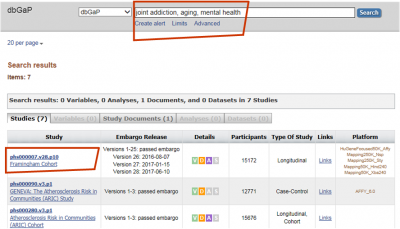
- Click on the linked study title of interest for instructions on how to download the model DUC and determine if IRB approval is required. Model DUC and IRB Requirements can be found under the “Study” tab in the “Authorized Access” section (as shown in screenshot).
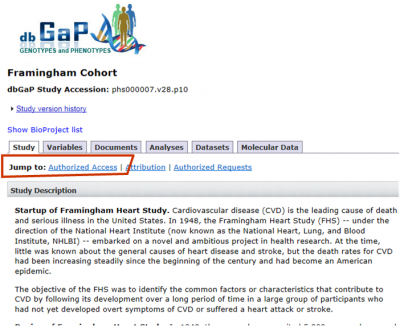
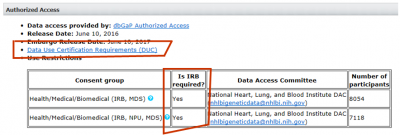
- If IRB approval is required, go to the section for “dbGaP Access Request” found at https://ovpr.uchc.edu//rcs/hspp/irb/irb-instructions-forms-and-samples/
download and complete the form “dbGaP Access Request Form for IRB Certification.”
- Complete the Data Security and Data Release Form (MS Word) (PDF).
- Email the completed Model Data Use Certification, IRB Approval for dbGaP Data Access (if required), and Data Security and Data Release Reporting form to the AVP for Research, Research IT Services – Dr. Khamis Abu-Hasaballah – at khamis@uconn.edu. Upon verification and approval of these documents, the AVP for Research will issue a certification letter signed by him, the Institutional Chief Security Officer, and the Institutional Signing Official (SPS Director).
ResearchMatch
 ResearchMatch.org is a national online recruitment tool for health research, funded by the National Institutes of Health and maintained at Vanderbilt University. ResearchMatch connects health researchers with individuals interested in volunteering, through its secure online matching tool. UConn Health is part of the ResearchMatch Network. There is no cost to UConn Health researchers to use ResearchMatch. There are currently over 120,000 registered volunteers across the country. ResearchMatch is also now available in Spanish and simplified Chinese.
To see if ResearchMatch might be a useful recruitment tool for your health-outcomes research study, use this link to register: https://www.researchmatch.org/researchers/. You do not need to be a Principal Investigator to register. The registration process takes less than 10 minutes. Once registered, you will be granted “feasibility access” to search volunteer aggregate data, including geographic and health demographics. Please note that you may not use ResearchMatch to recruit for a registry.
If you decide to use ResearchMatch to conduct participant recruitment, you will need IRB approval:
- The Vanderbilt IRB provides oversight for ResearchMatch as a recruitment tool and this has been documented within the ResearchMatch IRB Letter of Understanding (available upon request), but to use ResearchMatch as a recruitment tool for a specific study, you will first need to get UConn Health IRB approval.
- For the IRB submission, the following language may be used to describe ResearchMatch as a recruitment method: Potential volunteers will be contacted by ResearchMatch via an email contact message containing IRB-approved recruitment language for this study (not including direct study contact information such as email or phone number). Volunteers will then have the option of replying by clicking ‘yes’ or ‘no’ in the contact message. If a volunteer chooses to respond in the affirmative, they will authorize ResearchMatch to release their contact information to the PI (or ResearchMatch designee) who will be responsible for managing that information according to institutional guideline
- The contact message consists of the language to be used in the email sent by ResearchMatch on your behalf to potential participants. Please note that your contact message must not include your direct study contact information (email or phone), and must not exceed 2000 characters. If the study involves in-person participation, you may want to include the geographical location of the study site. If you intend to include healthy controls, specify that in your contact message, otherwise, a healthy control volunteer may decline participation. Please see contact message examples provided by ResearchMatch as well as this form that offers additional tips for creating an effective contact message.
- Once ResearchMatch is an IRB-approved recruitment method, you may then register as a researcher to request “recruitment access” in ResearchMatch. You will need to upload your IRB approval letter and your IRB-approved contact message. Recruitment access will give you the ability to send your contact message to potential participants that you select. If a potential participant agrees, you will then have access to his/her contact information in order to contact about possible study participation.
For questions about how to use ResearchMatch for your health research, please contact UConn/UConn Health ResearchMatch Liaison, Ellen Ciesielski, eciesielski@uchc.edu.
How to Register
 1. Request an account by emailing Ellen Ciesielski, UConn/UConn Health’s ClinicalTrials.gov PRS Administrator. You will be sent an automated email from the PRS system with your username and password.
2. On the PRS log-in page, in the Organization field, enter “UConnHealth” (no spaces) if your account was created under UConn Health or “UConn” if your account was created under UConn.
3. Click on the blue “Create New Record” button on the far right of the page. The system will walk you through the creation of the record. Data entered on previous pages will be retained so that you can return to complete the record at a later date.
The person who creates the record is the “Record Owner.” The Record Owner may be the Principal Investigator (PI) or someone designated by the PI to create/update the record on his/her behalf. The PI must perform the final review and approval of the record and each subsequent update in the PRS. The PI is responsible for ensuring that accurate information about the trial is entered and that updates to the record are completed in a timely manner (see table below for specific deadlines).
Complete the below fields as follows:
-
-
- Organization’s Unique Protocol ID: Enter the IRB number.
- Secondary IDs: Enter the grant number.
- Record Verification Date: Enter the month and year in which you are completing the record. This field will need to be updated each time you update the record after it is registered.
- Primary Completion Date: Enter the anticipated final data collection date, specifically regarding the Primary Outcome Measure.
- Responsible Party: Select the Principal Investigator from the drop-down menu.
- Collaborators: Add any other organizations providing support, including funding, design, implementation, data analysis and reporting.
-
For studies reviewed by UConn Health:
-
-
- Board Name: UConn Health IRB
- Board Affiliation: UConn Health
- Board Contact phone and e-mail: 860.679.8729; irb@uchc.edu
- Board Contact Address: UConn Health IRB, 263 Farmington Avenue, Farmington, CT 06030-1511
-
For studies reviewed by UConn Storrs and Regional Campuses:
-
-
- Board Name: UConn IRB
- Board Affiliation: UConn
- Board Contact phone and e-mail: 860.486.0986; irb@uconn.edu
- Board Contact Address: UConn IRB, 438 Whitney Road Extension, Unit 1246, Storrs, CT 06269
-
The Final Rule dictates that ClinicalTrials.gov record fields are updated on the below schedule:
| Data Field | Deadline for Updating (i.e., not later than the specified date) |
|---|---|
| Study Start Date | 30 calendar days after the first subject is enrolled (if the first human subject was not enrolled at the time of registration). |
| Intervention Name(s) | 30 calendar days after a nonproprietary name is established. |
| Availability of Expanded Access | 30 calendar days after expanded access becomes available (if available after registration); and 30 calendar days after an NCT number is assigned to a newly created expanded access record. |
| Expanded Access Status | 30 calendar days after a change in the availability of expanded access. |
| Expanded Access Type | 30 calendar days after a change in the type(s) of available expanded access. |
| Overall Recruitment Status | 30 calendar days after a change in overall recruitment status. If Overall Recruitment Status is changed to “suspended,” “terminated,” or “withdrawn,” the Why Study Stopped data element must be submitted at the time the update is made. |
| Individual Site Status | 30 calendar days after a change in status of any individual site. |
| Human Subjects Protection Review Board Status | 30 calendar days after a change in status. |
| Primary Completion Date | 30 calendar days after the clinical trial reaches its actual primary completion date. |
| Enrollment | At the time the primary completion date is changed to “actual,” the actual number of participants enrolled must be submitted. |
| Study Completion Date | 30 calendar days after the clinical trial reaches its actual study completion date. |
| Responsible Party, by Official Title | 30 calendar days after a change in the responsible party or the official title of the responsible party. |
| Responsible Party Contact Information | 30 calendar days after a change in the responsible party or the contact information for the responsible party. |
| Device Product Not Approved or Cleared by U.S. FDA | 15 calendar days after a change in approval or clearance status has occurred. |
| Device Product Not Approved or Cleared by U.S. FDA | 15 calendar days after a change in approval or clearance status has occurred. |
| Record Verification Date | Any time the responsible party reviews the complete set of submitted clinical trial information for accuracy and not less than every 12 months, even if no other updated information is submitted at that time. |